Create A Reservation Template in HTML format
Learn how to create a professional-looking reservation confirmation template in HTML format for your hotel, resorts, B&B, and LodgeA lodging facility that is generally small and often designed is located in a rustic outdoors enviro.... This template can be emailed to your guest as a confirmation of their booking.
The reservation template includes the details of the reservation made by the guest such as arrival departure date, the number of guests staying, room rate, type of room booked, number of rooms, pick up details, details of deposit made, package details, etc.
This reservation confirmation should also outline the cancellation, no-show, and amendment policies of the hotel.
Step 1: Download the Sample Reservation Template ( HTML )
Note: If you want to save the files to your workstation click on the link and save the link as an HTML file.
Step 2: Open the HTML file on any web browser
- Click on the above sample links from Step 1 and open the HTML file on your web browser. In case you have downloaded these files to your computer then open those files with your preferred web browser eg: Internet Explorer, Chrome, Mozilla, etc.
- Once the HTML file is opened on the web browser press ( Ctrl + A ) on your keyboard to select all.
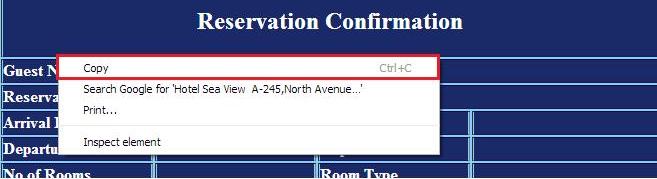
- Copy the highlighted selection with the right mouse click and select copy.
Step 3: Open your Email account and customize the template
- Login to your email account eg: Gmail, Hotmail, Yahoo, etc. We recommend Gmail, As you can also change the image to your choice with Gmail.
- Paste the HTML email template that you have copied in Step 2 to your email compose window.

- Make the required changes to your email template. And now you can start sending professional-looking HTML email confirmation letters to your guests.